- 可以将 UI 切分成一些独立的、可复用的组件,这样你就只需专注于构建每一个单独的部件
- 组件从概念上类似于
JavaScript函数。它接受任意的入参(props 属性),并返回用于描述页面展示内容的 React 元素
函数组件
- 函数组件接收一个单一的 props 对象并返回了一个 React 元素
- 组件名称必须以大写字母开头
- 组件必须在使用的时候定义或引用它
- 组件的返回值只能有一个根元素
- React 元素不但可以是 DOM 标签,还可以是用户自定义的组件
当 React 元素为用户自定义组件时,它会将 JSX 所接收的属性(attributes)转换为单个对象传递给组件,这个对象被称之为
props
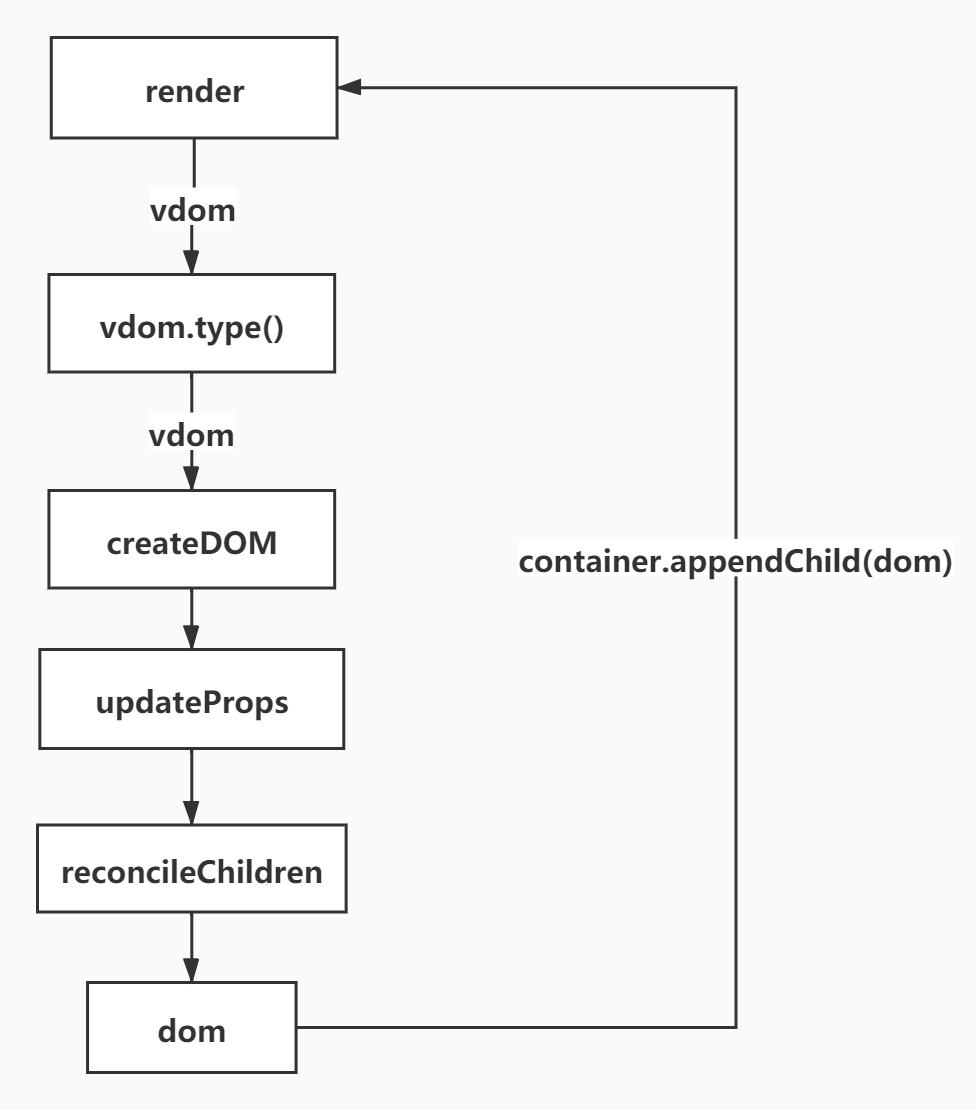
实现
src/index.js
js
import React from "./lib/react";
import ReactDOM from "./lib/react-dom";

function FunctionComponent({ title, name, age }) {
  return (
    <div className={title} style={{ color: "red" }}>
      {name} <span>{age}</span>
    </div>
  );
}
let element = (
  <FunctionComponent title="test" name="test" age={12}></FunctionComponent>
);

ReactDOM.render(element, document.getElementById("root"));
lib/react-dom.js
js{20,21,38-42,58-61}
import { REACT_TEXT } from "./element-types";

/**
 * 要把虚拟DOM转换成真实DOM并且挂载到容器中
 * @param {*} vdom 虚拟DOM
 * @param {*} container 容器
 */
function render(vdom, container) {
  mount(vdom, container);
}
function mount(vdom, container) {
  let newDOM = createDOM(vdom);
  container.appendChild(newDOM);
}
function createDOM(vdom) {
  const { props, type } = vdom;
  let dom; // 真实的DOM节点
  if (type === REACT_TEXT) {
    dom = document.createTextNode(props); // props是一个字符串
  } else if (typeof type === "function") {
    return mountFunctionComponent(vdom); // 函数组件
  } else {
    dom = document.createElement(type);
  }
  if (props) {
    // 如果props存在,更新属性
    updateProps(dom, {}, props);
    if (typeof props.children === "object" && props.children.type) {
      // 说明只有一个子节点
      mount(props.children, dom); // 递归渲染子节点
    } else if (Array.isArray(props.children)) {
      reconcileChildren(props.children, dom);
    }
  }
  return dom;
}

function mountFunctionComponent(vdom) {
  const { props, type: FunctionComponent } = vdom;
  let renderVdom = FunctionComponent(props); // renderVdom才是要渲染的虚拟DOM
  return createDOM(renderVdom);
}

function reconcileChildren(children, dom) {
  children.forEach((child) => {
    mount(child, dom);
  });
}

function updateProps(dom, oldProps = {}, newProps) {
  for (let key in newProps) {
    // 先遍历新的属性
    if (key === "children") continue;
    if (key === "style") {
      let styleObj = newProps[key];
      for (let attr in styleObj) {
        dom.style[attr] = styleObj[attr];
      }
    } else if (/^on[A-Z]*/.test(key)) {
      // 绑定的事件
      dom[key.toLowerCase()] = newProps[key];
    } else {
      // dom.className = 'title'
      dom[key] = newProps[key];
    }
  }
  // 再遍历老属性,如果新属性中没有直接删除掉
  for (let key in oldProps) {
    if (!newProps.hasOwnProperty(key)) {
      dom[key] = null;
    }
  }
}

const ReactDOM = {
  render,
};
export default ReactDOM;
类组件
- 类组件都需要继承
Component
src/index.js
js
import React from "./lib/react";
import ReactDOM from "./lib/react-dom";

class ClassComponent extends React.Component {
  render() {
    const { title, name, age } = this.props;
    return (
      <div className={title} style={{ color: "red" }}>
        {name} <span>{age}</span>
      </div>
    );
  }
}
let element = (
  <ClassComponent title="test" name="test" age={12}></ClassComponent>
);

ReactDOM.render(element, document.getElementById("root"));
lib/react.js
js{3,33}
import { REACT_ELEMENT } from "./element-types";
import { wrapToVdom } from "./utils";
import { Component } from "./Component";
// 把babel转换后的结果转成ReactDOM
function createElement(type, config, children) {
  // children:这里已经是一个虚拟DOM
  let key = config.key;
  let ref = config.ref;
  if (config) {
    delete config.__source;
    delete config._owner;
    delete config.__self;
    delete config.key;
    delete config.ref;
  }
  let props = { ...config };
  if (arguments.length > 3) {
    // 如果参数大于3,说明子节点是数组
    props.children = Array.prototype.slice.call(arguments, 2).map(wrapToVdom);
  } else {
    props.children = wrapToVdom(children);
  }
  return {
    $$typeof: REACT_ELEMENT, // 表示是一个虚拟DOM,或者说是React元素
    key,
    ref,
    type, // 虚拟DOM的类型,如果是函数/类组件,type就是组件本身
    props, // 像事件,id,属性,class,style等都在这里面
  };
}
const React = {
  createElement,
  Component,
};
export default React;
lib/react-dom.js
js{21-24,47-54}
import { REACT_TEXT } from "./element-types";

/**
 * 要把虚拟DOM转换成真实DOM并且挂载到容器中
 * @param {*} vdom 虚拟DOM
 * @param {*} container 容器
 */
function render(vdom, container) {
  mount(vdom, container);
}
function mount(vdom, container) {
  let newDOM = createDOM(vdom);
  container.appendChild(newDOM);
}
function createDOM(vdom) {
  const { props, type } = vdom;
  let dom; // 真实的DOM节点
  if (type === REACT_TEXT) {
    dom = document.createTextNode(props); // props是一个字符串
  } else if (typeof type === "function") {
    if (type.isReactComponent) {
      // 类组件
      return mountClassComponent(vdom);
    }
    return mountFunctionComponent(vdom); // 函数组件
  } else {
    dom = document.createElement(type);
  }
  if (props) {
    // 如果props存在,更新属性
    updateProps(dom, {}, props);
    if (typeof props.children === "object" && props.children.type) {
      // 说明只有一个子节点
      mount(props.children, dom); // 递归渲染子节点
    } else if (Array.isArray(props.children)) {
      reconcileChildren(props.children, dom);
    }
  }
  return dom;
}

function mountFunctionComponent(vdom) {
  const { props, type: FunctionComponent } = vdom;
  let renderVdom = FunctionComponent(props); // renderVdom才是要渲染的虚拟DOM
  return createDOM(renderVdom);
}
function mountClassComponent(vdom) {
  const { props, type: ClassComponent } = vdom;
  // 先创建类组件实例
  let classInstance = new ClassComponent(props);
  // 调用render方法返回renderVdom
  let renderVdom = classInstance.render();
  return createDOM(renderVdom);
}
function reconcileChildren(children, dom) {
  children.forEach((child) => {
    mount(child, dom);
  });
}

function updateProps(dom, oldProps = {}, newProps) {
  for (let key in newProps) {
    // 先遍历新的属性
    if (key === "children") continue;
    if (key === "style") {
      let styleObj = newProps[key];
      for (let attr in styleObj) {
        dom.style[attr] = styleObj[attr];
      }
    } else if (/^on[A-Z]*/.test(key)) {
      // 绑定的事件
      dom[key.toLowerCase()] = newProps[key];
    } else {
      // dom.className = 'title'
      dom[key] = newProps[key];
    }
  }
  // 再遍历老属性,如果新属性中没有直接删除掉
  for (let key in oldProps) {
    if (!newProps.hasOwnProperty(key)) {
      dom[key] = null;
    }
  }
}

const ReactDOM = {
  render,
};
export default ReactDOM;
lib/Component.js
js
class Updater {
  constructor(classInstance) {
    this.classInstance = classInstance;
    // 需要支持批量更新,所以这里必须是数组
    this.pendingStates = [];
  }
  addState(newState) {
    this.pendingStates.push(newState);
    this.emitUpdate();
  }
  emitUpdate() {
    this.updateComponent();
  }
  updateComponent() {
    const { classInstance, pendingStates } = this;
    if (pendingStates.length > 0) {
      // 表示有更新的状态
      shouldUpdate(classInstance, this.getState());
    }
  }
  getState() {
    const { classInstance, pendingStates } = this;
    let { state } = classInstance; // 实例的老状态
    pendingStates.forEach((nextState) => {
      // 合并新老状态
      state = { ...state, ...nextState };
    });
    return state;
  }
}
function shouldUpdate(classInstance, nextState) {
  classInstance.forceUpdate(nextState);
}
export class Component {
  static isReactComponent = true;
  constructor(props) {
    this.props = props;
    this.updater = new Updater(this);
  }
  setState(newState) {
    this.updater.addState(newState);
  }
  forceUpdate(nextState) {
    console.log("forceUpdate", nextState);
    // this.state = nextState
    // this.render()
  }
}
组件的更新
- 组件的数据来源有两个地方,分别是属性对象和状态对象
- 属性是父组件传递过来的
- 状态是自己内部的,改变状态唯一的方式就是
setState - 属性和状态的变化都会影响视图更新
- 不要直接修改
State,构造函数是唯一可以给this.state赋值的地方
src/index.js
js
import React from "./lib/react";
import ReactDOM from "./lib/react-dom";
class Counter extends React.Component {
  constructor(props) {
    super(props);
    this.state = { number: 0 };
  }
  handleClick = () => {
    this.setState({ number: this.state.number + 1 });
  };
  render() {
    return (
      <div>
        <p>{this.props.title}</p>
        <p>number:{this.state.number}</p>
        <button onClick={this.handleClick}>+</button>
      </div>
    );
  }
}
ReactDOM.render(<Counter title="计数器" />, document.getElementById("root"));
lib/react-dom.js
- 创建真实 DOM(createDOM)的时候需要将虚拟 DOM 和真实 DOM 进行关联
- 挂载函数/类组件的时候需要在虚拟 DOM 上保存老的虚拟 DOM
首先调用createDOM的时候 vdom
text
{
  $$typeof: Symbol(react.element),
  key: undefined,
  props: { title: '计数器', name: 'test', age: 12 },
  ref: undefined,
  type: class Component
}调用mountClassComponent的时候实例的render方法返回的才是组件的真正虚拟 DOM
text
{
  $$typeof: Symbol(react.element),
  key: undefined,
  props: {
    children: [
      ...
    ]
  }
}
js{39-40,47-48,57-59,92-119}
import { REACT_TEXT } from "./element-types";

/**
 * 要把虚拟DOM转换成真实DOM并且挂载到容器中
 * @param {*} vdom 虚拟DOM
 * @param {*} container 容器
 */
function render(vdom, container) {
  mount(vdom, container);
}
function mount(vdom, container) {
  let newDOM = createDOM(vdom);
  container.appendChild(newDOM);
}
function createDOM(vdom) {
  const { props, type } = vdom;
  let dom; // 真实的DOM节点
  if (type === REACT_TEXT) {
    dom = document.createTextNode(props); // props是一个字符串
  } else if (typeof type === "function") {
    if (type.isReactComponent) {
      // 类组件
      return mountClassComponent(vdom);
    }
    return mountFunctionComponent(vdom); // 函数组件
  } else {
    dom = document.createElement(type);
  }
  if (props) {
    // 如果props存在,更新属性
    updateProps(dom, {}, props);
    if (typeof props.children === "object" && props.children.type) {
      // 说明只有一个子节点
      mount(props.children, dom); // 递归渲染子节点
    } else if (Array.isArray(props.children)) {
      reconcileChildren(props.children, dom);
    }
  }
  // 创建真实DOM的时候和虚拟DOM进行关联
  vdom.dom = dom;
  return dom;
}

function mountFunctionComponent(vdom) {
  const { props, type: FunctionComponent } = vdom;
  let renderVdom = FunctionComponent(props); // renderVdom才是要渲染的虚拟DOM
  // 保存老的虚拟DOM
  vdom.oldRenderVdom = renderVdom;
  return createDOM(renderVdom);
}
function mountClassComponent(vdom) {
  const { props, type: ClassComponent } = vdom;
  // 先创建类组件实例
  let classInstance = new ClassComponent(props);
  // 调用render方法返回renderVdom
  let renderVdom = classInstance.render();
  vdom.classInstance = classInstance; // vdom和实例进行关联
  // 类的实例上保存老的虚拟DOM,同时给vdom上也添加oldRenderVdom指向老的vdom
  classInstance.oldRenderVdom = vdom.oldRenderVdom = renderVdom;
  return createDOM(renderVdom);
}
function reconcileChildren(children, dom) {
  children.forEach((child) => {
    mount(child, dom);
  });
}

function updateProps(dom, oldProps = {}, newProps) {
  for (let key in newProps) {
    // 先遍历新的属性
    if (key === "children") continue;
    if (key === "style") {
      let styleObj = newProps[key];
      for (let attr in styleObj) {
        dom.style[attr] = styleObj[attr];
      }
    } else if (/^on[A-Z]*/.test(key)) {
      // 绑定的事件
      dom[key.toLowerCase()] = newProps[key];
    } else {
      // dom.className = 'title'
      dom[key] = newProps[key];
    }
  }
  // 再遍历老属性,如果新属性中没有直接删除掉
  for (let key in oldProps) {
    if (!newProps.hasOwnProperty(key)) {
      dom[key] = null;
    }
  }
}
/**
 * 根据虚拟DOM找到真实DOM
 * @param {*} vdom
 * 如果是像div节点,这样是可以通过vdom.dom找到真实DOM
 * 如果是类组件或者函数组件有两种情况
 *  1、创建函数/类组件的时候在虚拟DOM上通过oldRenderVdom绑定了虚拟DOM
 *  2、如果是组件嵌套组件,那就需要进行递归查找了
 */
export function findDOM(vdom) {
  if (!vdom) return null;
  if (vdom.dom) {
    // vdom对应原生的组件
    return vdom.dom;
  } else {
    // 类组件或函数组件
    let renderVdom = vdom.classInstance
      ? vdom.classInstance.oldRenderVdom
      : vdom.oldRenderVdom;
    return findDOM(renderVdom);
  }
}

export function compareTwoVdom(parentDOM, oldVdom, newVdom) {
  let oldDOM = findDOM(oldVdom); // 老的真实DOM
  let newDOM = createDOM(newVdom); // 新的真实DOM
  parentDOM.replaceChild(newDOM, oldDOM); // 新的替换老的
}

const ReactDOM = {
  render,
};
export default ReactDOM;
lib/Component.js
js{47-55}
import { compareTwoVdom, findDOM } from "./react-dom";

class Updater {
  constructor(classInstance) {
    this.classInstance = classInstance;
    // 需要支持批量更新,所以这里必须是数组
    this.pendingStates = [];
  }
  addState(newState) {
    this.pendingStates.push(newState);
    this.emitUpdate();
  }
  emitUpdate() {
    this.updateComponent();
  }
  updateComponent() {
    const { classInstance, pendingStates } = this;
    if (pendingStates.length > 0) {
      // 表示有更新的状态
      shouldUpdate(classInstance, this.getState());
    }
  }
  getState() {
    const { classInstance, pendingStates } = this;
    let { state } = classInstance; // 实例的老状态
    pendingStates.forEach((nextState) => {
      // 合并新老状态
      state = { ...state, ...nextState };
    });
    return state;
  }
}
function shouldUpdate(classInstance, nextState) {
  classInstance.state = nextState;
  classInstance.forceUpdate();
}
export class Component {
  static isReactComponent = true;
  constructor(props) {
    this.props = props;
    this.updater = new Updater(this);
  }
  setState(newState) {
    this.updater.addState(newState);
  }
  forceUpdate() {
    console.log("forceUpdate");
    // 老的虚拟DOM
    let oldRenderVdom = this.oldRenderVdom;
    // 找到真的DOM
    let oldDOM = findDOM(oldRenderVdom);
    // 调用render方法获取新的虚拟DOM
    let newRenderVdom = this.render();
    compareTwoVdom(oldDOM.parentNode, oldRenderVdom, newRenderVdom);
    this.oldRenderVdom = newRenderVdom;
  }
}