- 抽象语法树(Abstract Syntax Tree) 是源代码语法结构的一种抽象表示
- 它以树状的形式表现变成语言的语法结构,树上的每个节点都表示源代码中的一种结构
用途
- 代码语法检查、代码风格检查、代码格式化、代码高亮、代码错误提示、代码自动补全等
- 优化变更代码,代表代码结构以便达到想要的结构
抽象语法树定义
这些工具的原理都是通过 JavaScript Parser 把代码转换为一颗抽象语法树,这棵树定义了代码的结构,通过操作这颗树可以精准定位到声明语句、赋值语句、运算语句等,实现对代码的分析、优化、变更等操作
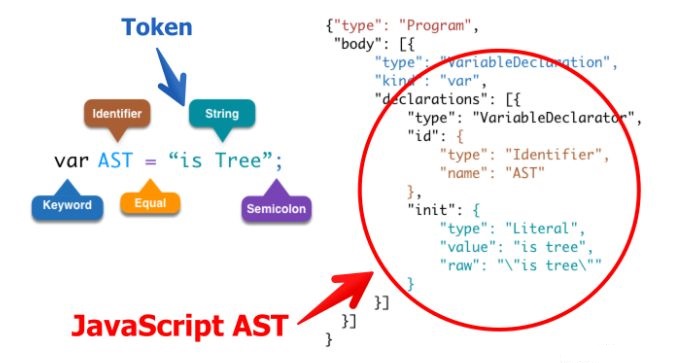
JavaScript Parser
JavaScript Parser是把 JavaScript 源码转化为抽象语法树的解析器
常用的 JavaScript Parser
- SpiderMonkey
- estree
- esprima
- acorn
- babel parser
AST 节点
- estree
- spec.md
- astexplorer
- AST 节点
- File 文件
- Program 程序
- Literal 字面量 NumericLiteral StringLiteral BooleanLiteral
- Identifier 标识符
- Statement 语句
- Declaration 声明语句
- Expression 表打死
- Class 类
AST 遍历
- astexplorer
- AST 是深度优先遍历
bash
npm i esprima estraverse escodegen -Sjs
let esprima = require("esprima"); //把JS源代码转成AST语法树
let estraverse = require("estraverse"); ///遍历语法树,修改树上的节点
let escodegen = require("escodegen"); //把AST语法树重新转换成代码
let code = `function ast(){}`;
let ast = esprima.parse(code);
let indent = 0;
const padding = () => " ".repeat(indent);
estraverse.traverse(ast, {
  // 遍历
  enter(node) {
    console.log(padding() + node.type + "进入");
    if (node.type === "FunctionDeclaration") {
      node.id.name = "newAst"; // 修改
    }
    indent += 2;
  },
  leave(node) {
    indent -= 2;
    console.log(padding() + node.type + "离开");
  },
});
const result = escodegen.generate(ast);
console.log(result); // function newAst(){}
text
Program进入
  FunctionDeclaration进入
    Identifier进入
    Identifier离开
    BlockStatement进入
    BlockStatement离开
  FunctionDeclaration离开
Program离开
Babel
工作流程
- Babel 能够转译
ECMAScript 2015+的代码,使其能再就得浏览器或者环境中也可以运行 - 工作过程分为三个部分
- Parser(解析) 将源码转换成抽象语法树,树上有很多 estree 节点
- Transform(转换) 对抽象语法树进行转换
- Generate(代码生成) 将上一步经过转换的抽象语法树生成新的代码
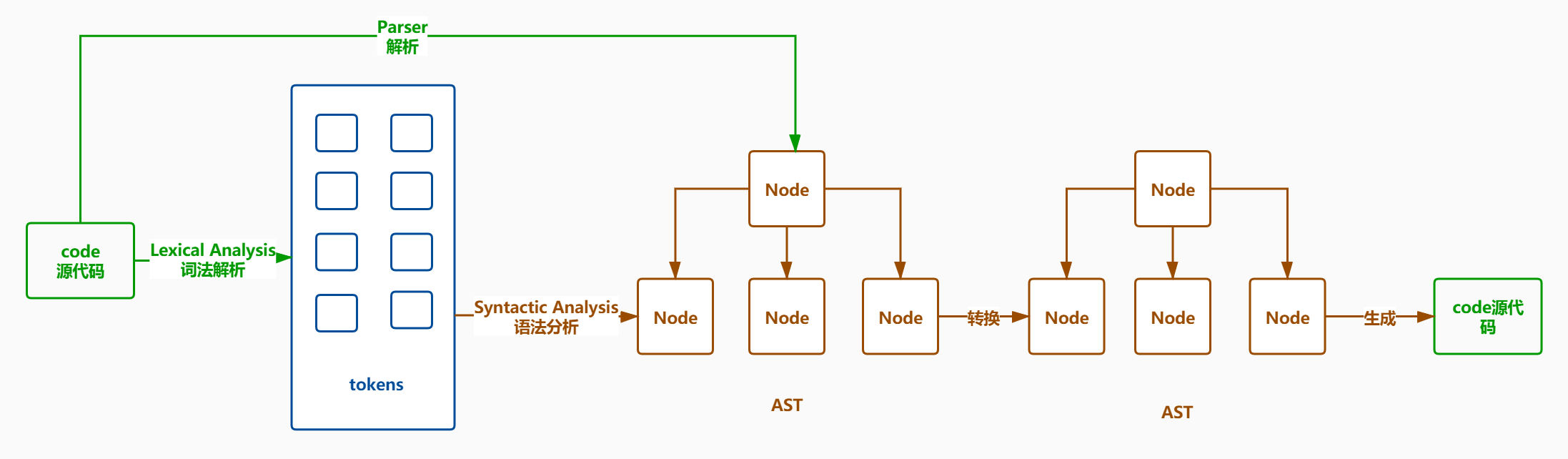
babel 插件
- @babel/parser 把源码转换成 AST
- @babel/traverse 用于 AST 的遍历,维护整棵树的状态,并且负责替换、移除和添加节点
- @babel/generate 可以把 AST 生成源码,同时生成 sourcemap
- @babel/types 用于 AST 节点的 Lodash 式工具库, 它包含了构造、验证以及变换 AST 节点的方法,对编写处理 AST 逻辑非常有用, identifier: 生成节点
- @babel/template 简化 AST 创建逻辑
- @babel/code-frame 打印代码位置
- @babel/core Babel 的编译器,核心 API 都在里面,比如常见的 transform、parse,并实现了插件功能
- babylon Babel 的解析器,以前叫 babel-parser,是基于 acorn 扩展而来,扩展了很多语法,可以支持 ES2020、JSX、Typescript 等语法
- babel-types-api
- Babel 插件手车
- babeljs.io 可视化编辑器
- babel-types
- 类型别名
- Definitely Typed
Visitor
- 访问者模式 Visitor 对于某个对象或者一组对象、不同的访问者产生的结果不同,执行操作也不同
- Visitor 的对象定义了用具 AST 中获取具体节点的方法
- Visitor 上挂载以节点
type命名的方法,当遍历 AST 的时候,如果匹配上 type,就会执行对应的方法
path
- path: 节点路径
- node: 当前 AST 节点
- parent: 符 AST 节点
- parentPath: 父 AST 节点的路径
- scope: 作用域
- get(key): 获取某个属性的 path
- set(key, value): 设置某个属性
- is 类型(opts): 判断当前节点是否是某个类型
- find(callback): 从当前节点一直向上查找到根节点(包括自己)
- findParent(callback): 从当前节点一直向上查到到根节点(不包括自己)
- insertBefore(nodes): 在之前插入节点
- insertAfter(nodes): 在之后插入节点
- replaceWith(replacement): 用某个节点替换当前节点
- replaceWithMultiple(nodes): 用多个节点替换当前节点
- replaceWithSourceString(replacement): 把源代码转换成 AST 节点再替换当前节点
- remove(): 删除当前节点
- traverse(visitor, state): 遍历当前节点的子节点,visitor: 参数节点,state: 用来传递数据的状态
- skip(): 跳过当前节点子节点的遍历
- stop(): 结束所有的遍历
scope
- scope
- scope.bindings 当前作用域内声明所有变量
- scope.path 生成作用域的节点对应的路径
- scope.references 所有的变量引用的路径
- getAllBindings() 获取从当前作用域一直到根作用域的集合
- getBinding(name) 从当前作用域到根使用域查找变量
- getOwnBinding(name) 在当前作用域查找变量
- parentHasBinding(name, noGlobals) 从当前父作用域到根使用域查找变量
- removeBinding(name) 删除变量
- hasBinding(name, noGlobals) 判断是否包含变量
- moveBindingTo(name, scope) 把当前作用域的变量移动到其它作用域中
- generateUid(name) 生成作用域中的唯一变量名,如果变量名被占用就在前面加下划线
转换箭头函数
- astexplorer
- babel-plugin-transform-es2015-arrow-functions
- babeljs.io babel 可视化编译器
- babel-handbook babel 手册
- babel-types-api
js
const babel = require("@babel/core");
const types = require("@babel/types");
// const transformEs2015ArrowFunctions = require('babel-plugin-transform-es2015-arrow-functions');

// babel插件就是一个对象,包含一个visitor
const transformEs2015ArrowFunctions = {
  visitor: {
    // 这里面的函数名就是你需要的转换语句的type,path就是对应的路径,node是对应的节点
    ArrowFunctionExpression(path) {
      const { node } = path;
      hoistFunctionEnvironment(path); // 绑定this
      node.type = "FunctionExpression"; // 箭头函数 转换成 函数表达式
      const { body } = node;
      if (!types.isBlockStatement()) {
        // 判断body是不是一个块级,如果不是就创建一个块级,内容就是一个return语句 加上原来的body内容
        node.body = types.blockStatement([types.returnStatement(body)]);
      }
    },
  },
};
const hoistFunctionEnvironment = (path) => {
  // 根据当前节点向上查找父节点,如果父节点是函数并且不是箭头函数或者父节点就是根节点就停止
  const thisEnv = path.findParent((parent) => {
    return (
      (parent.isFunction() && !parent.isArrowFunctionExpress()) ||
      parent.isProgram()
    );
  });
  let thisBindings = "_this";
  let thisPaths = getThisPaths(path);
  if (thisPaths.length) {
    thisEnv.scope.push({
      // 给父级作用域添加一个节点 const _this = this
      id: types.identifier(thisBindings), // 生成节点  节点名
      init: types.thisExpression(), // 生成this节点  节点值
    });
    thisPaths.forEach((thisPath) => {
      // this => _this
      thisPath.replaceWith(types.identifier(thisBindings));
    });
  }
};
const getThisPaths = (path) => {
  let thisPaths = []; // 保存所有子节点下使用了this的
  path.traverse({
    // 遍历当前节点下的所有子节点
    ThisExpression(thisPath) {
      // 找到有使用this的地方
      thisPaths.push(thisPath);
    },
  });
  return thisPaths;
};

const sourceCode = `
 const sum = (a,b)=> {
   return a + b
 }
`;

const sourceCode1 = `
const sum = (a,b)=> {
 console.log(this);
 return a + b
}
`;
const sourceCode2 = `
const sum = (a,b)=> a + b
`;
const result = babel.transform(sourceCode2, {
  plugins: [transformEs2015ArrowFunctions],
});
console.log(result.code);
类转换为函数
js
const babel = require("@babel/core");
const types = require("@babel/types");

// const transformClasses = require('@babel/plugin-transform-classes');

const transformClasses = {
  visitor: {
    ClassDeclaration(path) {
      const { node } = path;
      const classMethods = node.body.body; // constructor和getName两个方法
      const { id } = node; // Person
      const newNodes = [];
      classMethods.forEach((classMethod) => {
        if (classMethod.kind === "constructor") {
          const constructor = types.functionDeclaration(
            id,
            classMethod.params,
            classMethod.body
          );
          newNodes.push(constructor);
        } else {
          // 赋值表达式
          const AssignmentExpression = types.assignmentExpression(
            "=",
            types.memberExpression(
              // 成员表达式 Person.prototype.getName
              types.memberExpression(
                // Person.prototype
                id, // Person
                types.identifier("property") // property
              ),
              classMethod.key // getName
            ),
            types.functionExpression(
              // function () {return this.name}
              null, // 函数名
              classMethod.params, // 参数
              classMethod.body // 函数体内容
            )
          );
          newNodes.push(AssignmentExpression);
        }
      });
      if (newNodes.length === 1) {
        path.replaceWith(newNodes[0]);
      }
    },
  },
};

const sourceCode = `
  class Person{
    constructor(name){
      this.name = name
    }
    getName(){
      return this.name
    }
    setName(value) {
      this.name = value
    }
  }
`;
/**
 function Person(name) {
   this.name = name
 }
 Person.prototype.getName = function(){
   return this.name
 }
 */
const result = babel.transform(sourceCode, {
  plugins: [transformClasses],
});
console.log(result.code);
日志插件
js
const path = require("path");
const babel = require("@babel/core");
const types = require("@babel/types");

// const transformClasses = require('@babel/plugin-transform-classes');

const loggerPlugin = {
  visitor: {
    // console是一个方法调用
    CallExpression(path, state) {
      const { node } = path;
      if (types.isMemberExpression(node.callee)) {
        const { object, property } = node.callee;
        if (object.name === "console") {
          if (["log", "warn", "info", "error"].includes(property.name)) {
            // 行列信息需要展示 'Hide location data'
            const { line, column } = node.loc.start;
            // 这里添加行和列
            const { filename, cwd: cwdPos } = state.file.opts;
            const absoluteName = filename.replace(/\\/g, "/"); // 绝对路径
            const relativeName = absoluteName.slice(
              cwdPos.replace(/\\/g, "/").length
            ); // 相对路径
            node.arguments.unshift(
              types.stringLiteral(
                `${relativeName}:${line} line:${column} column`
              )
            );
          }
        }
      }
    },
  },
};

const sourceCode = `
  console.log('外部')
  function sum(a,b){
    console.log('日志')
    return a + b
  }
`;

const result = babel.transform(sourceCode, {
  filename: "sum.js",
  plugins: [loggerPlugin],
});
console.log(result.code);
自动日志插件
在类似监控的情况下可以使用
- @babel/helper-module-imports 导入模块帮助类
js
const importModule = require("@babel/helper-module-imports");
// 1
// addDefault: 默认导入的方法, addName:解构导入,addNamespace: 命名导入
const loggerId = importModule.addDefault(path, "loggerId", {
  nameHint: path.scope.generateUid("logger"), // 保证命名不冲突
});
// loggerId: 一个导入节点- @babel/template 根据字符串模板生成 AST 节点
js
const template = require("@babel/template");
// 等价于help-module-imports 中的1
const loggerId = path.scope.generateUid("logger"); // 生成loggerId
const importDeclaration = template.statement(
  `import ${loggerId} from 'logger'`
)();
path.node.body.unshift(importDeclaration); // 头部插入

// 两种写法等价
// state.loggerNode = types.expressionStatement(types.callExpression(types.identifier(loggerId), []))
state.loggerNode = template.statement(`${loggerId}()`)();state用于在遍历过程中 AST 节点之间传递数据
autoLogger
js
const importModule = require("@babel/helper-module-imports"); // 导入模块的帮助类
const babel = require("@babel/core");
const types = require("@babel/types");
const template = require("@babel/template");

const autoLogger = ({ libName }) => {
  return {
    visitor: {
      // 1、需要捕获Program,用来确保此模块内一定会引入logger模块
      Program(path, state) {
        let loggerId;
        path.traverse({
          // 遍历Program下的所有子节点
          ImportDeclaration(importPath) {
            const { node } = importPath;
            if (libName === node.source.value) {
              // const specifierPath  = path.get('specifiers.0').node; 层级深的时候可用
              const specifierPath = node.specifiers[0];
              if (
                specifierPath.isImportDefaultSpecifier() ||
                specifierPath.isImportSpecifier() ||
                specifierPath.isImportNamespaceSpecifier()
              ) {
                // 虽然导入有三种方式,默认导入、解构导入、命名方式导入,但是导入名称都是放在local.name上
                loggerId = specifierPath.local.name;
              }
              importPath.stop(); // 停止循环,跳出
            }
          },
        });
        if (!loggerId) {
          // 说明还没有导入logger
          // 1、使用模块导入帮助类的默认导入方法,新增一个默认导入
          // loggerId = importModule.addDefault(path, 'logger', {
          //   /*
          //     scope = {
          //       bindings: [] // 放置的是当前作用域中已有的变量,
          //       generatedUid(name) {} 如果bindings中已经有了name变量,会添加下划线,主要就是保证不会重名
          //     }
          //   */
          //   nameHint: path.scope.generateUid('logger') 保证命名不冲突
          // }).name
          // 2、使用template模板生成节点,并插入
          loggerId = path.scope.generateUid("logger"); // 生成loggerId
          const importDeclaration = template.statement(
            `import ${loggerId} from 'logger'`
          )();
          path.node.body.unshift(importDeclaration); // 头部插入
        }
        // 1、构建一个logger()的调用
        // types.callExpression: 生成一个logger(),在AST中外层包裹了一个expressionStatement
        // state.loggerNode = types.expressionStatement(types.callExpression(types.identifier(loggerId), []))
        // 2、template模板生成一个节点,需要调用
        state.loggerNode = template.statement(`${loggerId}()`)();
      },
      "FunctionDeclaration|ArrowFunctionExpression|FunctionExpression|ClassMethod"(
        path,
        state
      ) {
        // 逻辑一致可以使用这种方式
        const { node } = path;
        if (types.isBlockStatement(node.body)) {
          node.body.body.unshift(state.loggerNode);
        } else {
          const newBody = types.blockStatement([
            state.loggerNode,
            types.returnStatement(node.body),
          ]);
          path.get("body").replaceWith(newBody);
        }
      },
      // FunctionDeclaration(path, state) { // 函数声明
      // },
      // ArrowFunctionExpression(path, state) { // 箭头函数

      // },
      // FunctionExpression(path, state) { },
      // ClassMethod(path, state) { }
    },
  };
};
module.exports = autoLogger;
Typescript 插件
js
const { transformSync } = require("@babel/core");

const transformType = (type) => {
  switch (type) {
    case "TSNumberKeyword":
    case "NumberTypeAnnotation":
    case "NumericLiteral":
      return "number";
    case "TSStringKeyword":
    case "StringTypeAnnotation":
    case "StringLiteral":
      return "string";
  }
};
const tsc = {
  pre(file) {
    file.set("errors", []);
  },
  visitor: {
    VariableDeclarator(path, state) {
      // 1
      const { node } = path;
      const errors = state.file.get("errors");
      const idType = transformType(node.id.typeAnnotation.typeAnnotation.type);
      if (node.init) {
        const initType = transformType(node.init.type);
        if (initType !== idType) {
          Error.stackTraceLimit = 0;
          errors.push(
            path.buildCodeFrameError(`无法把${initType}赋值给${idType}`, Error)
          );
        }
      }
    },
    AssignmentExpression(path, state) {
      // 2
      const errors = state.file.get("errors");
      const variable = path.scope.getBinding(path.get("left"));
      const variableAnnotation = variable.path.get("id").getTypeAnnotation();
      const variableType = transformType(
        variableAnnotation.typeAnnotation.type
      );
      const valueType = transformType(
        path.get("right").getTypeAnnotation().type
      );
      if (variableType !== valueType) {
        Error.stackTraceLimit = 0;
        errors.push(
          path
            .get("init")
            .buildCodeFrameError(
              `无法把${valueType}赋值给${variableType}`,
              Error
            )
        );
      }
    },
    CallExpression(path, state) {
      // 3、4
      const errors = state.file.get("errors");
      const trueTypes = path.node.typeParameters.params.map((param) => {
        //TSTypeReference   typeName=Infer  typeParameters=[]
        if (param.type === "TSTypeReference") {
          const name = param.typeName.name; //Infer
          const { typeParams, typeAnnotation } = path.scope.getData(name); //typeParams=['K']
          const trueTypeParams = typeParams.reduce((memo, name, index) => {
            memo[name] = param.typeParameters.params[index].type; //TSLiteralType
            return memo;
          }, {}); //trueTypeParams={K:'TSLiteralType'}
          const { checkType, extendsType, trueType, falseType } =
            typeAnnotation;
          let check = checkType.type;
          if (check === "TSTypeReference") {
            check = trueTypeParams[checkType.typeName.name];
          }
          if (transformType(check) === transformType(extendsType.type)) {
            return transformType(trueType.type);
          } else {
            return transformType(falseType.type);
          }
        } else {
          return transformType(param.type);
        }
      });
      const argumentsTypes = path
        .get("arguments")
        .map((arg) => transformType(arg.getTypeAnnotation().type));
      const calleePath = path.scope.getBinding(
        path.get("callee").node.name
      ).path;
      const genericMap = new Map();
      calleePath.node.typeParameters.params.map((item, index) => {
        genericMap[item.name] = trueTypes[index];
      });
      const paramsTypes = calleePath.get("params").map((arg) => {
        const typeAnnotation = arg.getTypeAnnotation().typeAnnotation;
        if (typeAnnotation.type === "TSTypeReference") {
          return genericMap[typeAnnotation.typeName.name];
        } else {
          return transformType(type);
        }
      });
      Error.stackTraceLimit = 0;
      paramsTypes.forEach((type, index) => {
        if (type !== argumentsTypes[index]) {
          errors.push(
            path
              .get(`arguments.${index}`)
              .buildCodeFrameError(
                `实参${argumentsTypes[index]}不能匹配形参${type}`,
                Error
              )
          );
        }
      });
    },
    TSTypeAliasDeclaration(path) {
      //  4
      const typeName = path.node.id.name;
      const typeInfo = {
        typeParams: path.node.typeParameters.params.map((item) => item.name), //['K']
        typeAnnotation: path.getTypeAnnotation(), //{checkType,extendsType,trueType,falseType}
      };
      path.scope.setData(typeName, typeInfo);
    },
  },
  post(file) {
    console.log(...file.get("errors"));
  },
};
const sourceCode = `
  // 1
  var age:string = '12';
  // 2
  var age1:number;
  age1 = 12;
  // 3
  function join<T>(a:T,b:T):string{
    return a+b;
  }
  join<number>(1,2);
  // 4
  type Infer<K> = K extends 'number' ? number : string;
    function sum<T>(a: T, b: T) {

    }
    sum<Infer<'number'>>(1, 2);
`;
const { code } = transformSync(sourceCode, {
  parserOpts: { plugins: ["typescript"] },
  plugins: [tsc],
});
console.log(code);
ESLint 插件
js
const { transformSync } = require("@babel/core");
const eslintPlugin = ({ fix }) => {
  return {
    pre(file) {
      // 节点遍历前的钩子
      file.set("errors", []);
    },
    visitor: {
      CallExpression(path, state) {
        const { node } = path;
        const errors = state.file.get("errors");
        if (node.callee.object.name === "console") {
          // const tmp = Error.stackTraceLimit; // 可以修改堆栈信息的深度,默认为10
          Error.stackTraceLimit = 1; // 去掉错误堆栈信息
          errors.push(path.buildCodeFrameError("不能存在console语句", Error));
          if (fix) {
            path.remove();
          }
        }
      },
      DebuggerStatement(path, state) {
        const errors = state.file.get("errors");
        // const tmp = Error.stackTraceLimit; // 可以修改堆栈信息的深度,默认为10
        Error.stackTraceLimit = 0; // 去掉错误堆栈信息
        errors.push(path.buildCodeFrameError("不能存在debugger", Error));
        if (fix) {
          path.remove();
        }
      },
    },
    post(file) {
      // 节点遍历完成后的节点
      console.log(...file.get("errors"));
    },
  };
};

let sourceCode = `
  var a = 1;
  var b = 2;
  function sum(a,b){
    debugger;
    console.log(a);
    return a + b
  }
`;
const { code } = transformSync(sourceCode, {
  plugins: [eslintPlugin({ fix: true })],
});
console.log(code);
module.exports = eslintPlugin;
uglifyPlugin
- 变量重命名,从有意思变成无意义
js
const path = require("path");
const { transformSync } = require("@babel/core");
const types = require("@babel/types");

// 把变量从有意义变成无意思,且尽可能的短
const uglifyPlugin = {
  pre(file) {
    file.set("errors", []);
  },
  visitor: {
    // 需要捕获那些能生成作用域的节点,函数|类的方法|函数表达式|语句块|if|while|for...,但是正常写法会有很多,所以提供了一个Scopable的别名
    Scopable(path) {
      // 去除作用域内所有的变量进行重命名 scope.bindings:当前作用域内所有变量
      Object.entries(path.scope.bindings).forEach(([key, bindings]) => {
        const newName = path.scope.generateUid("a");
        bindings.path.scope.rename(key, newName);
      });
    },
  },
  post(file) {
    console.log(...file.get("errors"));
  },
};

let sourceCode = `
  function getAge(){
    var age = 12;
    console.log(age);
    var name = 'test';
    console.log(name);
  }
`;
const { code } = transformSync(sourceCode, {
  plugins: [uglifyPlugin],
});
console.log(code);
按需加载插件
src/index.js
js
import { flatten, concat } from "lodash";
// import flatten from 'lodash/flatten'
// import concat from 'lodash/concat
webpack.config.js
js
const path = require("path");
const babelPluginImport = require("./babel-plugin-import");
module.exports = {
  mode: "development",
  entry: "./src/index.js",
  output: {
    path: path.resolve(__dirname, "dist"),
    filename: "bundle.js",
  },
  module: {
    rules: [
      {
        test: /.js$/,
        use: {
          loader: "babel-loader",
          options: {
            plugins: [
              [
                babelPluginImport,
                { libraryName: "lodash", libraryDirectory: "" },
              ],
            ],
          },
        },
      },
    ],
  },
};
babel-plugin-import.js
js
//用来生成或者判断节点的AST语法树的节点
const types = require("@babel/types");

const babelPluginImport = () => {
  return {
    visitor: {
      // 在webpack中使用的时候options需要在state.opts中获取
      ImportDeclaration(path, state) {
        const { node } = path; // 获取节点
        const { source, specifiers } = node; // source:lodash,  specifiers: [导入内容] 获取批量导入声明数组
        const { libraryName, libraryDirectory } = state.opts; // 获取选项中的支持的库的名称
        //如果当前的节点的模块名称是我们需要的库的名称,并且导入不是默认导入才会进来
        if (
          source.value === libraryName &&
          !types.isImportDefaultSpecifier(specifiers[0])
        ) {
          const declarations = specifiers.map((specifier) => {
            const sourceName = types.stringLiteral(
              [libraryName, libraryDirectory, specifier.imported.name]
                .filter(Boolean)
                .join("/")
            );
            //返回一个importDeclaration节点
            return types.importDeclaration(
              [types.importDefaultSpecifier(specifier.local)], // import flatten from
              sourceName // lodash/flatten
            );
          });
          // 批量替换节点
          path.replaceWithMultiple(declarations);
        }
      },
    },
  };
};
module.exports = babelPluginImport;