调试 webpack
通过 Chrome 调试
在项目目录下执行下面的命令
bash
node --inspect-brk ./node_modules/webpack-cli/bin/cli.js然后打开 Chrome 浏览器控制台就可以了
通过执行命令调试
- 打开工程目录,点击调试按钮,再点击小齿轮配置按钮就会生成
launch.json配置文件 - 修改好了以后直接点击 F5 就可以启动调试 vscode\launch.json
json
{
  "version": "0.2.0",
  "configurations": [
    {
      "type": "node", // pwa-node
      "request": "launch",
      "name": "debug webpack",
      "cwd": "${workspaceFolder}",
      "program": "${workspaceFolder}/node_modules/webpack-cli/bin/cli.js" // workspaceFolder:当前工作目录
    }
  ]
}
debugger.js
- 然后打开调试工具,点击运行和调试
js
const webpack = require("webpack");
const webpackOptions = require("./webpack.config");
const compiler = webpack(webpackOptions);
debugger;
compiler.run((err, stats) => {
  console.log(err);
  console.log(
    stats.toJson({
      assets: true,
      chunks: true,
      modules: true,
    })
  );
});
tapable.js
- tapable 是一个类似于 Node.js 中的 EventEmitter 的库,单是更专注于自定义事件的触发和处理
- webpack 通过 tapable 将实现与流程解耦,所有具体实现通过插件的形式存在
js
// const { SyncHook } = require('tapable');

class SyncHook {
  constructor(args) {
    this.args = args;
    this.argsLen = args ? args.length : 0;
    this.taps = [];
  }
  tap(name, fn) {
    this.taps.push({ name, fn });
  }
  call() {
    let args = Array.prototype.slice.call(arguments, 0, this.argsLen);
    this.taps.forEach((tap) => tap.fn(...args));
  }
}

const hook = new SyncHook(["", ""]);
// 注册两个监听器
hook.tap("监听器1", (name, age) => {
  console.log("监听器1", name, age);
});
hook.tap("监听器2", (name) => {
  console.log("监听器2", name);
});
// 执行监听器并传参,这里传递的参数需要在new 的时候去接收,名称无所谓,但是长度可以根据需求来
hook.call("名称", "年龄");

// webpack会在提供对应的钩子,用户自己监听钩子然后执行
class Plugin {
  apply() {
    hook.tap("webpack提供的钩子", () => {
      console.log("用户想在对应钩子的处理");
    });
  }
}
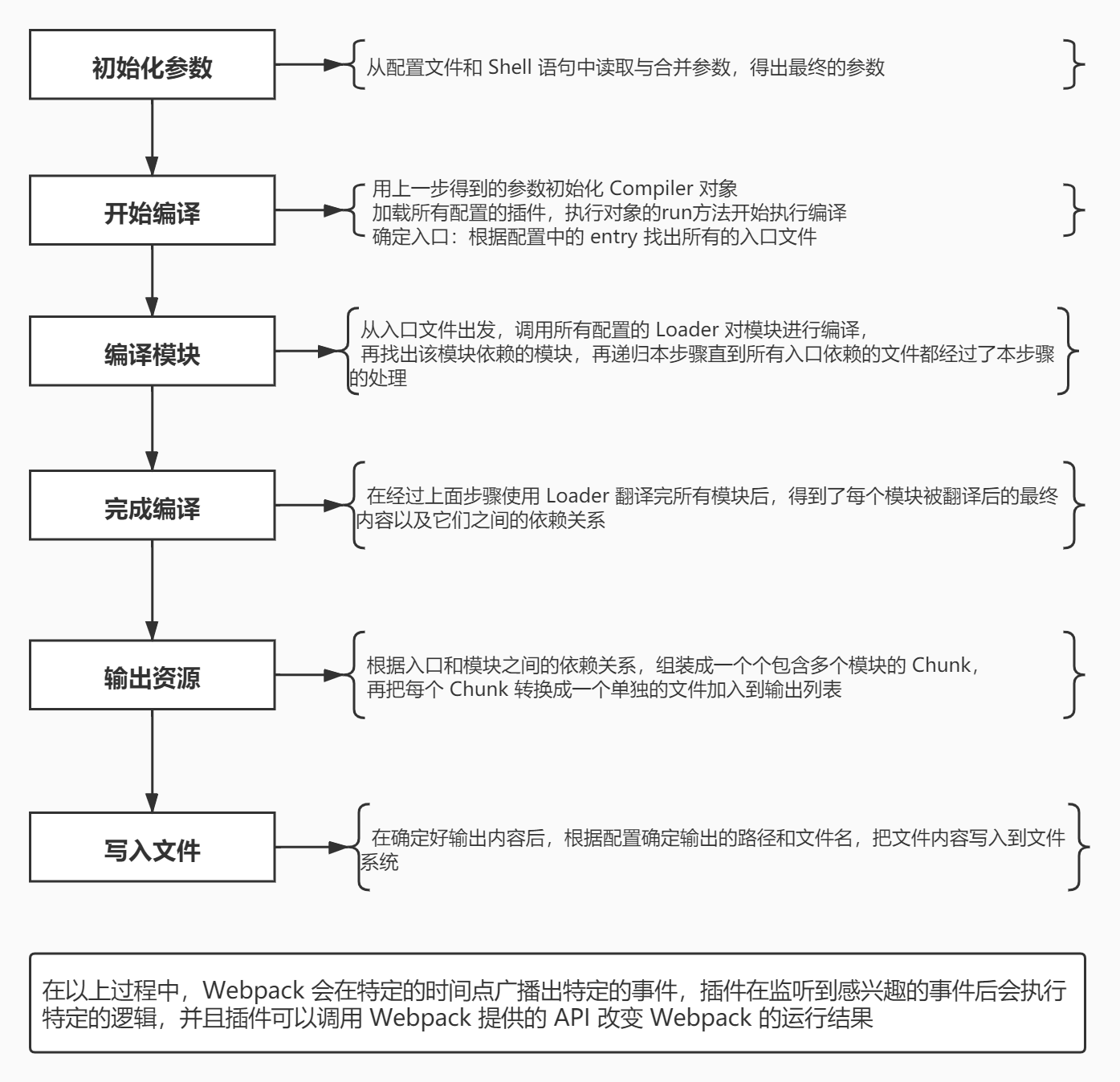
webpack 编译流程
- 初始化参数:从配置文件和 shell 语句中读取并合并参数,得到最终的配置对象
- 用上一步的对象初始化
Compiler对象
- 用上一步的对象初始化
- 加载所有的插件
- 执行
Compiler对象的run方法开始执行编译虽然 webpack 只有一个 Compiler,但是每次编译都会产生一个 Compilation
- 执行
- 根据配置文件中的
entry配置项找到所有的入口
- 根据配置文件中的
- 从入口文件触发,调用所有配置的规则,比如说 loader 对模块进行编译
- 再找出此模块的依赖模块,再递归本步骤找到所有的模块进行编译
- 等把所有的模块编译完成后,根据模块之间的依赖关系,组装成一个个包含多个模块的
Chunk
- 等把所有的模块编译完成后,根据模块之间的依赖关系,组装成一个个包含多个模块的
- 再把各个代码块 Chunk 转换成文件(asset)加入到输出列表
- 最后确定好输出内容后,根据配置的输出路径和文件名,把文件内容写入到文件系统中
在以上过程中,Webpack 会在特定的时间点广播出特定的事件,插件在监听到对应事件后执行特定的逻辑,并且插件可以调用 Webpack 提供的 API 改变 Webpack 的运行结果
- 最后确定好输出内容后,根据配置的输出路径和文件名,把文件内容写入到文件系统中
debugger.js
js
const webpack = require("./webpack");
const webpackOptions = require("./webpack.config");
const compiler = webpack(webpackOptions);

compiler.run((err, stats) => {
  let json = stats.toJSON({
    assets: true, // 本次编译产出的资源
    chunks: true, // 产出的代码块
    modules: true, // 产出的模块
  });
});
webpack.config.js
js
const path = require("path");
const DonePlugin = require("./plugins/DonePlugin.js");
const RunPlugin = require("./plugins/runPlugin.js");
module.exports = {
  mode: "production",
  // entry: './src/entry1.js'
  entry: {
    // 一般来说每个入口会生成一个代码块,每个代码块chunk里面放着本入口模块和它依赖的模块
    entry1: "./src/entry1.js",
    entry2: "./src/entry2.js",
  },
  output: {
    path: path.resolve(__dirname, "dist"),
    filename: "[name].js",
  },
  resolve: {
    extensions: ["js", "jsx"],
  },
  module: {
    rules: [
      {
        test: /\.js$/,
        use: [
          path.resolve(__dirname, "loaders/logger.js"),
          path.resolve(__dirname, "loaders/logger1.js"),
        ],
      },
    ],
  },
  plugins: [new RunPlugin({ msg: "run 消息" }), new DonePlugin()],
};
plugins/DonePlugin.js
js
class RunPlugin {
  constructor(options) {
    this.options = options;
  }
  apply(compiler) {
    compiler.hooks.run.tap("RunPlugin", () => {
      console.log("run plugin", this.options.msg);
    });
  }
}

module.exports = RunPlugin;
plugins/RunPlugin.js
js
class DonePlugin {
  apply(compiler) {
    compiler.hooks.done.tap("DonePlugin", () => {
      console.log("done plugin");
    });
  }
}

module.exports = DonePlugin;
webpack.js
js
const Compiler = require("./Compiler");

function webpack(options) {
  // 1、初始化参数:从配置文件和 shell 语句中读取并合并参数(shell 语句中的优先级高),得到最终的配置对象
  const argv = process.argv.slice(2);
  // node debugger.js --mode=development
  let shellOptions = argv.reduce((shellOptions, option) => {
    let [key, value] = option.split("=");
    shellOptions[key.slice(2)] = value;
    return shellOptions;
  }, {});
  let finalOptions = { ...options, ...shellOptions };
  // 2.用上一步的对象初始化 Compiler 对象
  const compiler = new Compiler(finalOptions);
  // 3.加载所有的插件
  const { plugins = [] } = finalOptions;
  if (Array.isArray(plugins)) {
    for (let plugin of plugins) {
      plugin.apply(compiler);
    }
  }
  return compiler;
}

module.exports = webpack;
Compiler.js
js
const fs = require("fs");
const path = require("path");
const { SyncHook } = require("tapable");
const Compilation = require("./Compilation");
class Compiler {
  constructor(options) {
    this.options = options;
    this.hooks = {
      run: new SyncHook(), // 编译开始时触发run钩子
      done: new SyncHook(), // 编译结束时触发done钩子
    };
  }
  // 4.执行`Compiler`对象的`run`方法开始执行编译
  run(callback) {
    // 在编译前触发run钩子执行,表示开始启动编译了,编译是异步执行
    this.hooks.run.call(); // 这里的call和js中的call方法没有关系,只是一个钩子函数的调用
    // 编译成功之后回调
    const onCompiled = (err, stats, fileDependencies) => {
      console.log(1);
      // 10.在确定好输出内容后,会根据配置的输出路径和文件名,把文件内容写入文件系统中
      for (let filename in stats.assets) {
        let filePath = path.join(this.options.output.path, filename);
        const dirname = path.dirname(filePath);
        let exist = fs.existsSync(dirname);
        if (!exist) {
          fs.mkdirSync(dirname);
        }
        fs.writeFileSync(filePath, stats.assets[filename], "utf8");
      }
      callback(err, {
        toJSON: () => stats,
      });
      fileDependencies.forEach((file) => {
        fs.watch(file, () => this.compile(onCompiled));
      });
      // 编译成功后触发done钩子执行
      this.hooks.done.call();
    };
    // 开始编译,编译成功后调用onCompiled方法
    this.compile(onCompiled);
  }
  compile(callback) {
    // 虽然webpack只有一个Compiler,但是每次编译都会产出一个新的Compilation
    let compilation = new Compilation(this.options);
    // 执行compilation的build方法进行编译,成功后执行回调
    compilation.build(callback);
  }
}

module.exports = Compiler;
Compilation.js
js
const fs = require("fs");
const path = require("path");
const parser = require("@babel/parser");
const types = require("@babel/types");
const traverse = require("@babel/traverse").default;
const generator = require("@babel/generator").default;
function toUnixPath(path) {
  return path.replace(/\\/g, "/");
}
const baseDir = toUnixPath(process.cwd()); // 命令执行的地方

class Compilation {
  constructor(options) {
    this.options = options;
    this.modules = []; // 本次编译所有生成出来的模块
    this.chunks = []; // 本次编译产出的代码块,入口文件和依赖资源打包在一起成为代码块
    this.assets = {}; // 本次编译产出的资源
    this.fileDependencies = new Set(); // 本次打包涉及了那些文件,为了实现watch,监听文件变化,文件发生变化后重新编译
  }
  build(callback) {
    // 5.根据配置文件中的`entry`配置项找到所有的入口
    let entry = {};
    if (typeof this.options.entry === "string") {
      entry = {
        main: this.options.entry,
      };
    } else {
      entry = this.options.entry;
    }
    // 6.从入口文件出发,调用所有配置的规则,比如说`loader`模块进行编译
    for (let entryName in entry) {
      // 入口的名名称就是entry的属性名,也将会成为代码块的名称
      // path.posix 统一路径分隔符
      let entryFilePath = path.posix.join(baseDir, entry[entryName]);
      // 把入口文件的绝对路径添加到依赖数组中
      this.fileDependencies.add(entryFilePath);
      let entryModule = this.buildModule(entryName, entryFilePath);
      this.modules.push(entryModule);
      // 8.等把所有的模块编译完成后,根据模块之间的依赖关系,组装成一个个包含多个模块的`chunk`
      let chunk = {
        name: entryName, // 代码块的名称就是入口名称
        entryModule, // 对应入口模块的对象
        modules: this.modules.filter((item) => item.names.includes(entryName)),
      };
      this.chunks.push(chunk);
    }
    // 9.再把各个代码块 chunk 转换成一个一个的文件加入到`output`列表中
    this.chunks.forEach((chunk) => {
      let filename = this.options.output.filename.replace("[name]", chunk.name);
      this.assets[filename] = getSource(chunk);
    });
    callback(
      null,
      {
        chunks: this.chunks,
        modules: this.modules,
        assets: this.assets,
      },
      this.fileDependencies
    );
  }
  buildModule(name, modulePath) {
    // 6.1:读取文件内容
    let sourceCode = fs.readFileSync(modulePath, "utf8");
    // buildModule返回一个模块对象,每个模块都有一个moduleId,等于相对于根目录的相对路径
    let moduleId = "./" + path.posix.relative(baseDir, modulePath);
    // 创建一个模块对象,name是此模块属于哪个模块,一个模块可能属于多个模块
    let module = { id: moduleId, names: [name], dependencies: [] };
    // 6.2:查找对应的loader对源码进行编译和转换
    let loaders = [];
    let { rules = [] } = this.options.module;
    if (Array.isArray(rules)) {
      rules.forEach((rule) => {
        let { test, use } = rule;
        // 如果模块的路径和正则匹配,酒吧对应的loader添加到loader数组
        if (modulePath.match(test)) {
          loaders.push(...use);
        }
      });
    }
    // 从右向左执行loader
    // 通过loader转译后的内容,一定是js
    sourceCode = loaders.reduceRight((sourceCode, loader) => {
      return require(loader)(sourceCode);
    }, sourceCode);
    // 7.再找出此模块的依赖模块,再递归本步骤找到依赖的模块进行编译
    let ast = parser.parse(sourceCode, { sourceType: "module" });
    traverse(ast, {
      CallExpression: (nodePath) => {
        const { node } = nodePath;
        // 如果式一个require方法调用
        if (node.callee.name === "require") {
          // entry1.js let  title = require('./title.js')
          // 获取依赖的模块  title.js
          let depModuleName = node.arguments[0].value;
          // 当前正在编译的模块所在的目录 entry1.js所在的目录
          let dirname = path.posix.dirname(modulePath);
          // 依赖模块的绝对路径
          let depModulePath = path.posix.join(dirname, depModuleName);
          // 获取配置的扩展名
          let extensions = this.options.resolve.extensions;
          // 尝试添加后缀,找到真实的文件
          depModulePath = tryExtensions(depModulePath, extensions);
          this.fileDependencies.add(depModulePath);
          // 获取依赖的模块ID
          let depModuleId = "./" + path.posix.relative(baseDir, depModulePath);
          // 修改语法,把依赖的模块改为依赖的模块ID
          // require('./title') => require('./src/title.js')
          node.arguments = [types.stringLiteral(depModuleId)];
          module.dependencies.push({ depModuleId, depModulePath });
        }
      },
    });
    // 重新生成新的代码
    let { code } = generator(ast);
    // 把转以后的源代码放到module._source属性上
    module._source = code;
    // 再递归本步骤,找到依赖的模块进行编译
    module.dependencies.forEach(({ depModuleId, depModulePath }) => {
      // 这里是由于可能存在一个模块被多个模块引用
      let existModule = this.modules.find((item) => item.id === depModuleId);
      // 如果modules中已经存在这个将要编译的依赖模块了,直接把此代码块的名称添加到对应依赖的模块name属性中
      if (existModule) {
        existModule.names.push(name);
      } else {
        let depModule = this.buildModule(name, depModulePath);
        this.modules.push(depModule);
      }
    });
    return module;
  }
}

function getSource(chunk) {
  return `
   (() => {
    var modules = {
      ${chunk.modules.map(
        (module) => `
        "${module.id}": (module) => {
          ${module._source}
        }
      `
      )}
    };
    var cache = {};
    function require(moduleId) {
      var cachedModule = cache[moduleId];
      if (cachedModule !== undefined) {
        return cachedModule.exports;
      }
      var module = (cache[moduleId] = {
        exports: {},
      });
      modules[moduleId](module, module.exports, require);
      return module.exports;
    }
    var exports ={};
    ${chunk.entryModule._source}
  })();
   `;
}
function tryExtensions(modulePath, extensions) {
  if (fs.existsSync(modulePath)) {
    return modulePath;
  }
  for (let i = 0; i < extensions.length; i++) {
    let filePath = modulePath + extensions[i];
    if (fs.existsSync(filePath)) {
      return filePath;
    }
  }
  throw new Error(`无法找到${modulePath}文件`);
}
module.exports = Compilation;